Best Fitness Tracker App in 2026: Features, Free Options and How to Choose

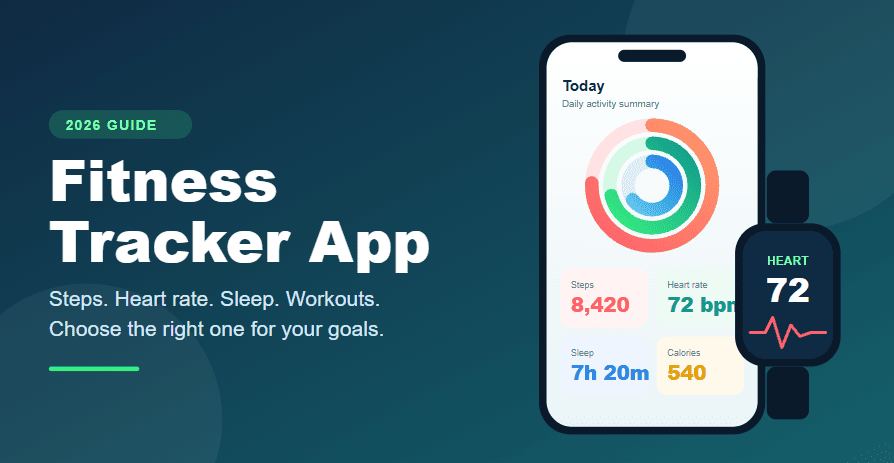
A fitness tracker app turns the data from your phone or wearable into something you can actually understand. It records your steps, workouts, heart rate, sleep and calories, then shows how your habits change over time. The right app can keep you consistent. The wrong one becomes another icon you never open.
This guide explains what a good fitness tracking app should do, which features matter most, how the leading apps differ, and how to choose one that fits your phone, budget and goals.
What Is a Fitness Tracker App?
A fitness tracker app is a mobile application that collects and displays information about your physical activity and general health. Some apps use your phone’s built-in sensors. Others pair with a smartwatch, band, ring or chest strap for more detailed readings.
Most apps cover some mix of these areas:
- Activity: steps, distance, active minutes and floors climbed
- Workouts: running, cycling, walking, gym sessions and other exercise
- Body signals: heart rate, resting heart rate and sometimes blood oxygen
- Sleep: time asleep and estimated sleep stages
- Nutrition: calories and, in some apps, meals and water
- Recovery: readiness or training-load scores that suggest when to rest
Not every app does all of these well. Choosing the right one starts with knowing which of these you actually care about.
Key Features of a Good Fitness Tracking App
1. Reliable activity and step tracking
Step counting is the baseline. A phone in your pocket gives a decent estimate, but a watch or band is usually more consistent because it stays on your body all day.
2. Heart rate and workout metrics
If you run, cycle or train hard, look for heart rate zones, pace, distance and calories burned. Wrist sensors are useful for trends. A chest strap is generally more accurate during intense exercise.
3. Sleep tracking
Sleep tracking helps you spot patterns such as late nights or irregular schedules. Treat sleep stages as estimates, not medical measurements.
4. Easy device and health-data sync
A good app connects with your phone’s health platform, such as Apple Health or Health Connect on Android. This lets several apps share one record instead of keeping separate histories.
5. Clear progress views
Weekly and monthly charts matter more than a busy dashboard. You should see in seconds whether you are moving more, sleeping better or training consistently.
6. Privacy and data export
Health data is personal. Check what the app collects, whether it shares data with third parties, and whether you can export or delete your history.
7. A useful free version
Almost every app has a free tier. Use it for a couple of weeks before paying, so you know whether the layout and sync fit your routine.
Popular Fitness Tracker Apps Compared
Features and prices change often, so confirm details in the app store before subscribing.
| App | Platform | Best for | Notable strength |
|---|---|---|---|
| Apple Fitness and Health | iPhone | iPhone and Apple Watch users | Activity rings and automatic syncing |
| Google Health (formerly the Fitbit app) | Android and iPhone | Fitbit and Pixel Watch owners | Sleep, activity and general wellness in one place |
| Samsung Health | Android (Galaxy) | Galaxy phone and watch users | Native tracking across Samsung devices |
| Strava | Android and iPhone | Runners and cyclists | GPS routes and a strong social community |
| Garmin Connect | Android and iPhone | Garmin watch owners | Deep training and recovery data |
| Health Connect | Android | Syncing apps together | One shared data store for many apps |
Apple Fitness and Apple Health
Both come built into the iPhone. Apple Health collects data from your phone, watch and other apps, while Apple Fitness shows daily activity and workouts. It works best with an Apple Watch and is limited to Apple devices.
Google Health
Google rebranded the Fitbit app as Google Health in 2026. It covers steps, workouts, sleep and heart rate, and works on both Android and iPhone. It is most accurate when paired with a Fitbit or Pixel Watch.
Samsung Health
If you own a Galaxy phone or Galaxy Watch, Samsung Health is the natural choice. It tracks activity, sleep, heart rate and workouts without needing extra apps.
Strava
Strava is built around outdoor activities. It records routes, pace and distance, and lets you follow friends and join challenges. It is less useful for indoor or gym-based training.
Garmin Connect
Garmin Connect turns data from Garmin watches into readable trends such as training load and recovery. Without a Garmin device, the app has limited value.
Health Connect
Health Connect is not a dashboard you open daily. It is the layer that lets Android fitness apps share information, which is useful if you use more than one app.
Do You Need a Wearable to Use a Fitness Tracker App?
No. Your phone can track steps, walking distance and basic activity on its own. A wearable adds continuous heart rate, better sleep data and automatic workout detection. If you are just starting, use a free app on your phone for a few weeks and buy a wearable only if you find yourself wanting more data.
Free vs Paid Fitness Tracker Apps
Free versions usually cover the essentials: step counting, workout logging and basic history. Paid plans typically add:
- Longer history and deeper analysis
- Guided workouts or training plans
- Advanced recovery and readiness insights
- Extra safety or live-tracking features
Pay only when a specific feature solves a problem you already have. If you are unsure, stay on the free tier.
How to Choose the Best Fitness Tracker App for You
Start with your device. If you wear an Apple Watch, Apple’s apps are the easiest path. A Galaxy Watch points to Samsung Health, a Garmin to Garmin Connect, and a Fitbit or Pixel Watch to Google Health.
Match the app to your goal.
- Want to move more? Choose a simple step and activity tracker.
- Training for a run or ride? Choose a GPS-focused app like Strava.
- Improving sleep? Pick an app with clear sleep trends.
- Lifting weights? Use a dedicated workout tracker app alongside your activity app.
Check platform flexibility. If you may switch between iPhone and Android, choose an app available on both and check whether your data can be exported.
Try before you commit. Use the free version in your normal routine for two weeks. Keep the app you open without being reminded.
Tips to Get More Out of Your Fitness Tracker App
- Set one realistic goal. For example, a daily step target you can reach on a normal day. If you want a simple place to start, our guide to walking 10,000 steps a day shows how to build the habit gradually.
- Wear or carry your device consistently. Gaps in data make trends unreliable.
- Review weekly, not hourly. Looking at your weekly average is more useful than reacting to a single day.
- Turn on only helpful notifications. Too many alerts lead people to switch the app off.
- Pair tracking with a routine. Data does not create motivation by itself. Learning how to make exercise a habit helps you turn numbers into action.
Common Mistakes to Avoid
- Trusting calorie numbers too much. Calories burned are estimates and can vary widely between devices.
- Chasing the perfect app. Consistent use of a simple app beats occasional use of a complex one.
- Ignoring privacy settings. Review what you share and with whom.
- Comparing yourself to others. Your baseline, age and fitness level are different from anyone else’s.
- Treating tracker data as medical advice. If you have health concerns, speak with a qualified professional.
Frequently Asked Questions
What is the best fitness tracker app?
It depends on your device and goals. Apple users usually do best with Apple Fitness and Health, Samsung users with Samsung Health, Fitbit and Pixel Watch owners with Google Health, runners and cyclists with Strava, and Garmin owners with Garmin Connect.
What is the best free fitness tracker app?
The built-in app on your phone is the best free starting point: Apple Health on iPhone, Samsung Health on Galaxy phones, or Health Connect with a compatible app on other Android phones.
Can a fitness tracker app work without a smartwatch?
Yes. A phone can count steps and estimate distance. A watch or band improves heart rate, sleep and workout accuracy.
Are fitness tracker apps accurate?
They are good for tracking trends, but individual numbers such as calories burned and sleep stages are estimates. Accuracy depends more on the hardware than on the app.
Is a fitness tracker app the same as a workout tracker app?
Not exactly. A fitness tracker app covers overall activity, sleep and health data. A workout tracker app focuses on logging exercises, sets and reps for gym training.
How often should I check my fitness tracker app?
Once a day for a quick look and once a week for a proper review is enough for most people.
Final Thoughts
The best fitness tracker app is the one that fits your phone, tracks the things you care about and keeps you coming back. Start with the free app on your device, choose one clear goal, and give it two weeks. If it helps you move more and stay consistent, keep it. If not, try another one.