A Practical Website Redesign Plan for Career and Education Businesses

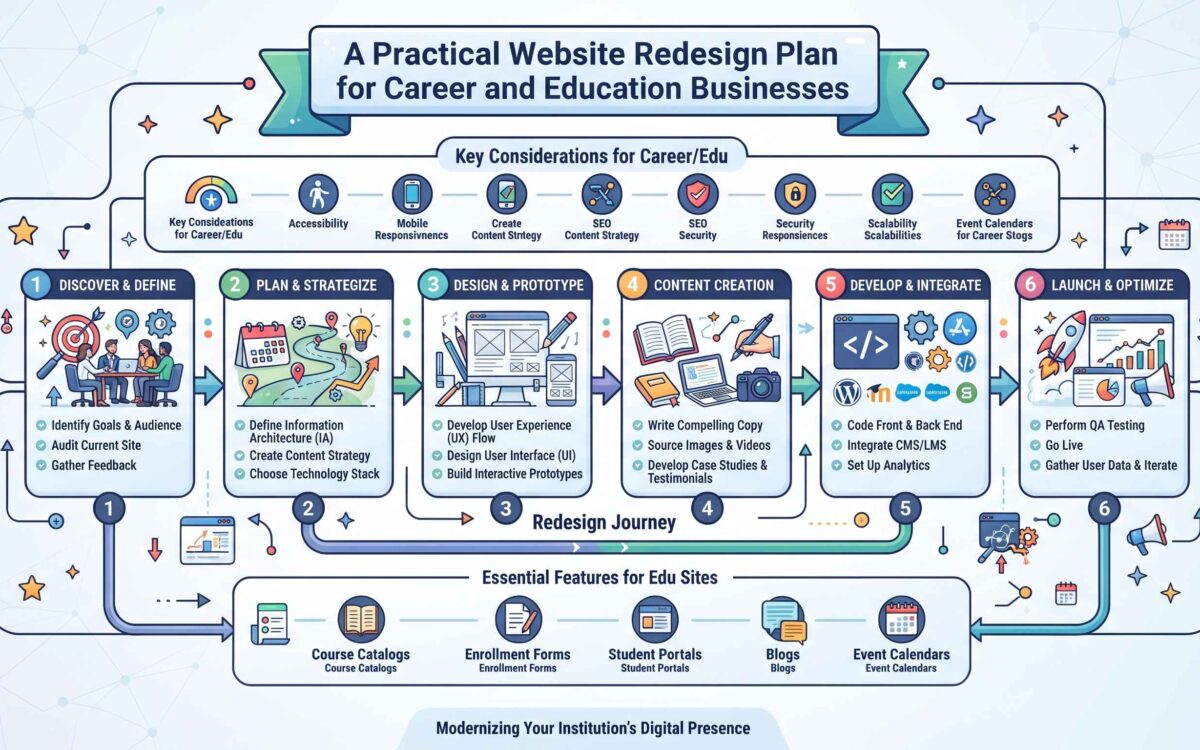
A website redesign can improve more than the look of a business online. For career coaches, recruiters, training providers, and employment services, a well-planned site helps visitors understand what is offered, find useful information, and take the next step. But changing layouts, URLs, or page content without preparation can also disrupt search traffic and lead enquiries. A thoughtful redesign starts with clear goals and a careful review of what already works.
Start With the Reason for the Redesign
Before choosing colors or browsing templates, identify the problems the new site should solve. Perhaps mobile visitors struggle to book a consultation, course information is difficult to locate, or the site no longer reflects the services the business provides. A redesign may also be needed to improve accessibility, speed, or the way content is organized.
Turn these observations into specific outcomes. “Make the site better” is difficult to evaluate; “increase completed consultation requests” or “make course details easier to find on a phone” gives the project a direction. Choose a small set of measures to monitor, such as enquiry form submissions, organic visits to key pages, or the percentage of visitors who complete an application.
Audit the Existing Website Before Changing It
A website audit helps distinguish outdated material from pages that still bring value. Review analytics and search performance, then make an inventory of important pages, forms, downloads, and external links. Ask which pages attract visitors, which generate enquiries, and which answer recurring questions from students or job seekers.
Content should not be removed simply because it is old. A useful article may have earned backlinks or continue to appear in search results. Update it, combine it with a stronger page, or redirect its URL if it is no longer needed. Record existing page addresses and their intended destinations so that redirects can be tested before launch.
- Keep a list of high-traffic and high-conversion pages.
- Check forms, booking tools, phone numbers, and email addresses.
- Identify duplicated, inaccurate, or thin content.
- Save current title tags, page descriptions, and URL structures.
- Note accessibility and mobile usability issues that need attention.
Plan the Structure Around Visitor Needs
People usually arrive with a practical question: Which service fits my situation? What does a program cost? How do I apply? Organize navigation around these tasks rather than internal department names. A recruiter might separate employer services from candidate resources, while a career coach could make coaching options, credentials, and appointment booking easy to find.
Sketch the page hierarchy before design begins. Keep the main navigation concise, use descriptive labels, and make the next action clear on important pages. A simple structure also helps search engines understand how topics relate. For example, a central career-planning page could connect to focused guides on interview preparation, resume writing, and job-search strategy.
Design for Accessibility, Mobile Use, and Trust
Responsive design is essential because visitors may browse between appointments, on public transport, or while comparing services on a phone. Test layouts at different screen sizes and make sure menus, forms, and buttons remain usable without excessive zooming. Readable text, adequate color contrast, descriptive image text, and keyboard-friendly controls benefit people with different needs and improve the overall experience.
Career and education services also handle personal decisions and, at times, sensitive information. Explain what happens after a visitor submits a form, avoid asking for unnecessary details, and make contact information easy to verify. Use clear, realistic descriptions of qualifications, outcomes, and service limits. Trust is built through useful information and transparent processes, not decorative claims.
Protect Search Visibility During the Build
Search optimization should be part of the project from the start, not a final polish. Preserve useful URLs where possible. When an address must change, create a direct permanent redirect to the closest relevant replacement and update internal links. Avoid sending every retired page to the homepage, since that gives returning visitors little help and can confuse search engines.
Review page titles, headings, metadata, image sizes, and internal links. Keep important text in crawlable page content rather than hiding it inside images. Before launch, check that staging pages are not accidentally accessible to search engines, then remove any blocking settings from the live site. A practical guide from Osdire explains how to plan a website redesign across planning, auditing, testing, and post-launch tasks.
Use Content to Reach the Right Audience
A redesigned site is only one part of an online presence. Helpful articles can answer questions before a visitor is ready to book or apply, while publishing on relevant external websites can introduce a service to readers who may not know it yet. Choose topics that genuinely help job seekers, employers, or learners, and make sure each article offers something beyond a sales pitch.
When considering outside publications, check audience fit, editorial standards, and whether the site accepts original contributions. A resource such as career and employment guest posting websites can help recruiters, career coaches, and employment businesses explore publishing opportunities. Treat any directory as a starting point: review each publication, its readership, and its contribution guidelines before preparing a pitch.
Test Before and After Launch
Testing should cover the full visitor journey, not just whether the homepage loads. Submit forms, test confirmation messages, follow booking links, check navigation on phones, and look for broken images or redirects. Compare key pages against the old site and confirm that analytics and search tools are recording activity correctly.
After launch, monitor traffic, rankings, enquiries, and error reports for several weeks. A small dip may occur as search engines process changes, but missing redirects or broken forms require prompt attention. Keep a record of problems and fixes, and schedule a follow-up review so the site continues to support the needs that led to the redesign.
A successful redesign is a planned improvement to how people find information and act on it. Clear goals, a thorough audit, accessible design, careful SEO handling, and ongoing checks can make the transition smoother—and give career and education organizations a website that serves both visitors and the people behind the service.