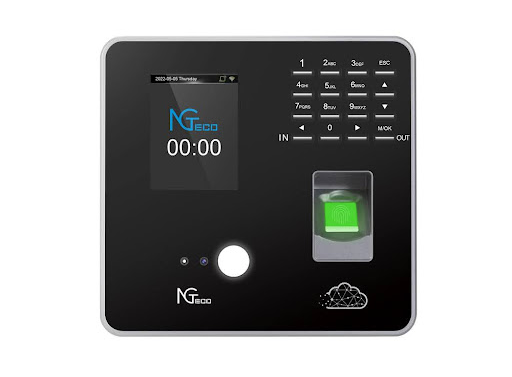
For HR managers and business owners, finding reliable time clock software without the burden of ongoing subscription fees can feel like searching for a needle in a haystack. While the market overflows with cloud-based solutions demanding monthly payments, many organizations prefer a one-time investment that delivers lasting value without recurring costs eating into their budget year after year.
The challenge isn’t just about avoiding subscriptions. Modern businesses need time tracking systems that offer real-time data synchronization across multiple locations, dependable technical support when issues arise, and the reliability to handle daily operations without disruption. Whether you’re managing a small team or coordinating hundreds of employees across different shifts, the right time clock software should simplify attendance tracking while providing the robust features necessary for accurate payroll processing and compliance reporting. Understanding what makes subscription-free time clock software a viable option requires examining both the immediate benefits and long-term considerations that impact your organization’s efficiency and bottom line.
Understanding Time Clock Software
Time clock software has evolved from simple punch-card systems into sophisticated digital platforms that serve as the backbone of workforce management. For HR managers, these systems eliminate the tedious manual calculations and paper trails that once consumed hours of administrative time each pay period. Modern time clock solutions automatically capture when employees clock in and out, calculate total hours worked including overtime, and flag potential discrepancies before they become payroll headaches.
The transformation from basic timekeeping to comprehensive attendance management reflects changing workplace demands. Today’s HR professionals need systems that don’t just record hours but provide actionable insights into labor costs, attendance patterns, and scheduling efficiency. Real-time data synchronization ensures that managers across different departments or locations see the same accurate information simultaneously, preventing the confusion that arises when multiple versions of timesheet data circulate through an organization.
Reliable software becomes particularly critical during peak business periods when accurate attendance tracking directly impacts operational capacity. When technical issues arise, responsive support teams make the difference between a minor inconvenience and a payroll crisis. The best time clock systems combine intuitive interfaces that employees can master quickly with robust backend capabilities that handle complex scheduling rules, multiple pay rates, and various compliance requirements. This balance between simplicity and power determines whether time clock software becomes an asset that streamlines operations or another frustrating tool that creates more work than it eliminates.
Why No Subscription Time Clock Software?
The financial appeal of time clock no subscription software extends far beyond the initial purchase price. Organizations that opt for one-time payment solutions eliminate the unpredictability of recurring expenses that compound over years. A subscription model charging $5 per employee monthly becomes $600 annually for just ten employees, accumulating to $6,000 over a decade. In contrast, perpetual license software requires a single upfront investment that doesn’t fluctuate with vendor pricing changes or force budget renegotiations each fiscal year.
Beyond cost considerations, ownership provides operational autonomy that subscription models cannot match. Companies maintain complete control over their data without depending on external servers that could experience outages or policy changes. This independence proves particularly valuable for businesses operating in areas with inconsistent internet connectivity or those handling sensitive employee information under strict data residency requirements. When you own the software outright, updates and modifications happen on your timeline rather than being forced during critical business periods.
The need for reliable technical support remains equally important regardless of payment structure. Quality subscription-free solutions provide comprehensive support packages that address implementation challenges, troubleshooting needs, and system optimization. Real-time data synchronization capabilities ensure that even locally-installed systems can share information across multiple terminals and locations without the latency issues that sometimes plague cloud-dependent platforms. For growing businesses, this combination of cost predictability, operational control, and dependable support creates a foundation for sustainable workforce management that adapts to changing needs without triggering unexpected expenses or vendor dependencies that constrain strategic flexibility.
Key Features of No Subscription Time Clock Software
The most effective subscription-free time clock systems distinguish themselves through cloud-based accessibility that doesn’t require ongoing service fees. These platforms store core functionality locally while offering optional cloud synchronization, giving organizations the flexibility to operate entirely offline or leverage internet connectivity when available. This hybrid approach ensures that daily operations continue uninterrupted even during network outages, while still providing the convenience of accessing reports and data from remote locations when needed.
User-friendly interfaces define whether employees embrace or resist new time tracking systems. The best solutions feature intuitive clock-in screens that require minimal training, allowing workers to record their time in seconds rather than navigating through complicated menus. Customizable settings accommodate diverse business needs, from configuring different pay codes for various job roles to establishing department-specific overtime rules. Administrators can tailor the system to match existing workflows rather than forcing operations to conform to rigid software limitations, creating a natural fit that reduces implementation friction and ongoing maintenance demands.
Security features protect sensitive payroll data through multi-layer authentication and encrypted storage that prevents unauthorized access to employee information. Real-time data synchronization across multiple terminals ensures that supervisors see updated attendance records immediately, eliminating delays that cause scheduling conflicts or payroll errors. Mobile access extends functionality beyond fixed time clocks, enabling field employees to record hours from job sites while managers review attendance patterns during off-site meetings. Comprehensive reporting capabilities transform raw time data into actionable insights, generating customizable reports that highlight attendance trends, labor cost distribution, and compliance metrics. These reports export seamlessly to payroll systems, reducing manual data entry and the errors that accompany transcription between platforms. Together, these features create an ecosystem where accurate time tracking becomes an automated background process rather than a daily administrative burden.
Technical Support and Customer Service
Reliable technical support transforms time clock software from a potential liability into a dependable operational asset. When payroll deadlines loom and system issues arise, immediate access to knowledgeable support staff prevents minor glitches from escalating into costly disruptions. The best subscription-free software providers offer multiple support channels including phone lines, email ticketing systems, and live chat options that connect users directly with technicians who understand both the software architecture and real-world HR challenges. Response times matter significantly during critical periods like month-end processing or when troubleshooting clock-in failures that affect multiple employees simultaneously.
Comprehensive customer service extends beyond reactive troubleshooting to include proactive assistance during implementation and ongoing optimization. Quality providers assign dedicated specialists who guide organizations through initial setup, helping configure attendance policies, establish user permissions, and integrate the system with existing payroll platforms. These specialists conduct training sessions that equip HR staff and managers with the knowledge to handle routine maintenance tasks independently, reducing dependency on external support for everyday operations. Regular check-ins during the first months of deployment identify potential issues before they impact daily workflows, ensuring smooth adoption across all user levels.
Extended support hours accommodate businesses operating outside traditional schedules, with the most responsive providers offering weekend and evening availability for organizations running multiple shifts or 24-hour operations. Documentation libraries complement direct support channels, providing searchable knowledge bases with step-by-step guides, video tutorials, and troubleshooting flowcharts that enable self-service problem resolution. Software updates delivered with clear release notes and migration assistance ensure that systems remain current without disrupting established processes, while version compatibility guarantees that older installations continue functioning reliably even as new features become available to those choosing to upgrade.
Real-Time Data Sync and Reporting
Real-time data synchronization stands as the cornerstone of effective attendance tracking, eliminating the delays and discrepancies that plague manual or batch-processed systems. When employees clock in at different terminals across multiple locations, instantaneous data updates ensure that supervisors see accurate attendance information within seconds rather than waiting for end-of-day uploads or manual consolidation. This immediate visibility prevents scheduling conflicts where managers might inadvertently assign overtime to employees who’ve already reached their weekly limits, or approve time-off requests without realizing critical shifts would go unstaffed. Organizations operating across time zones particularly benefit from synchronized systems that maintain consistent records regardless of where or when employees access the platform.
Customizable reporting capabilities transform raw attendance data into strategic insights that drive informed decision-making. Advanced time clock systems generate reports tailored to specific operational needs, from simple daily attendance summaries to complex analyses comparing labor costs across departments, identifying chronic tardiness patterns, or forecasting staffing requirements based on historical trends. Dashboard interfaces present key metrics through visual charts and graphs that highlight anomalies at a glance, allowing HR managers to spot potential issues like unexpected overtime spikes or attendance policy violations before they escalate into larger problems. Scheduled reports automate the delivery of critical information, sending weekly summaries to department heads or generating monthly compliance documentation without requiring manual intervention.
Export functionality bridges time clock systems with payroll platforms and accounting software through standardized file formats that eliminate manual data entry. One-click exports generate CSV or Excel files formatted to match specific payroll provider requirements, reducing processing time from hours to minutes while virtually eliminating transcription errors that cause payment delays and employee frustration. Audit trails embedded within reporting systems document every clock-in modification, deletion, or override, creating transparent records that satisfy compliance requirements and resolve disputes with verifiable timestamps. This combination of instantaneous synchronization and flexible reporting transforms attendance tracking from a reactive administrative task into a proactive management tool that optimizes workforce deployment and controls labor costs.
User-Friendly Interface
An intuitive interface determines whether time clock software becomes a seamless part of daily operations or a source of constant frustration for both employees and HR managers. The most effective systems feature clean, uncluttered screens where workers can clock in with just a few taps, eliminating confusion that leads to missed punches or incorrect entries. Large, clearly labeled buttons accommodate touchscreen terminals in manufacturing environments where employees wear gloves, while high-contrast color schemes ensure readability under varying lighting conditions from dimly lit warehouses to bright retail floors.
Easy navigation extends beyond the basic clock-in function to encompass all user interactions with the system. HR managers benefit from logical menu structures that group related functions together, allowing quick access to scheduling tools, attendance reports, and employee management features without clicking through multiple nested screens. Customizable dashboards let administrators prioritize the information most relevant to their roles, displaying real-time attendance summaries, pending approval requests, and schedule conflicts on a single overview screen that updates automatically throughout the day.
Mobile accessibility transforms time tracking from a fixed-location activity into a flexible capability that accommodates modern work arrangements. Dedicated smartphone applications provide field employees, remote workers, and traveling staff with the same intuitive clock-in experience available at physical terminals, complete with GPS verification that confirms location when required. Managers access full system functionality from tablets or phones, approving time-off requests during commutes, reviewing attendance reports between meetings, and adjusting schedules from any location with internet connectivity. This mobile-first design philosophy ensures that workforce management continues efficiently regardless of where business demands take key personnel, while maintaining the simplicity that encourages consistent adoption across all user groups.
Security and Compliance
Data security forms the foundation of trustworthy time clock software, protecting sensitive employee information from unauthorized access and potential breaches. Robust encryption protocols safeguard data both during transmission between terminals and while stored in databases, ensuring that personal details, social security numbers, and payroll information remain protected from external threats. Multi-factor authentication adds an additional security layer by requiring users to verify their identity through multiple credentials before accessing the system, preventing unauthorized individuals from manipulating attendance records or viewing confidential employee data even if passwords become compromised.
Access controls allow administrators to establish granular permission levels that restrict system functions based on user roles and responsibilities. HR managers receive full access to configure policies and generate comprehensive reports, while department supervisors see only the attendance data for their direct reports, and employees access solely their personal timesheets and schedules. These customizable restrictions prevent accidental or intentional data modifications by unauthorized personnel, creating clear accountability trails that document who accessed what information and when changes occurred. Regular security audits conducted by internal IT teams or external consultants identify potential vulnerabilities before they can be exploited, ensuring that protective measures evolve alongside emerging threats.
Compliance with regulations like GDPR, HIPAA, and various labor laws requires time clock systems that maintain detailed audit logs, implement data retention policies, and provide secure methods for information deletion when required. Software designed with compliance in mind includes built-in features that generate documentation proving adherence to working hour limitations, break requirements, and overtime regulations specific to different jurisdictions. Companies like NGTeco have developed time clock solutions that incorporate automated alerts to notify administrators when attendance patterns approach regulatory thresholds, enabling proactive intervention before violations occur. Data backup systems with encrypted storage ensure business continuity while maintaining compliance standards, allowing organizations to recover information following system failures without compromising security protocols or regulatory requirements that govern employee information management.
Making the Smart Investment in Subscription-Free Time Tracking
Subscription-free time clock software delivers lasting value through one-time investments that eliminate recurring costs while providing the robust features modern organizations require. Real-time data synchronization ensures accurate attendance tracking across multiple locations, giving managers immediate visibility into workforce patterns without delays that compromise scheduling decisions or payroll accuracy. Reliable technical support transforms these systems from potential complications into dependable operational tools, with responsive assistance available during critical periods when timely resolution prevents costly disruptions.
The combination of user-friendly interfaces, comprehensive security measures, and flexible reporting capabilities creates workforce management solutions that adapt to diverse business needs without forcing operational compromises. Organizations gain complete control over their data, implementation timelines, and system modifications while maintaining compliance with regulatory requirements through built-in audit trails and automated alerts. For HR managers seeking predictable costs, operational independence, and the technical reliability necessary for daily attendance tracking, subscription-free time clock software represents a strategic investment that continues delivering value year after year without the budget uncertainty that accompanies recurring payment models.